Batch Image Noise Reduction AI for Entire Folders on Your PC
Whole folders of noisy photos lose their noise in one run, and every result lands in the output folder as a PNG or JPG.
MKGpics AI BATCH PHOTO DENOISER is built for photo series. Add images or a complete folder to the list, choose the output folder and start the batch. The AI calculates on your own computer, with no subscription and no running costs.

Batch image noise reduction AI comes down to three parts: the photos go into a list, the AI reduces the noise in every image, and the finished files appear in the output folder. You get three strength profiles, the choice between PNG and JPG and a preview with original and result.
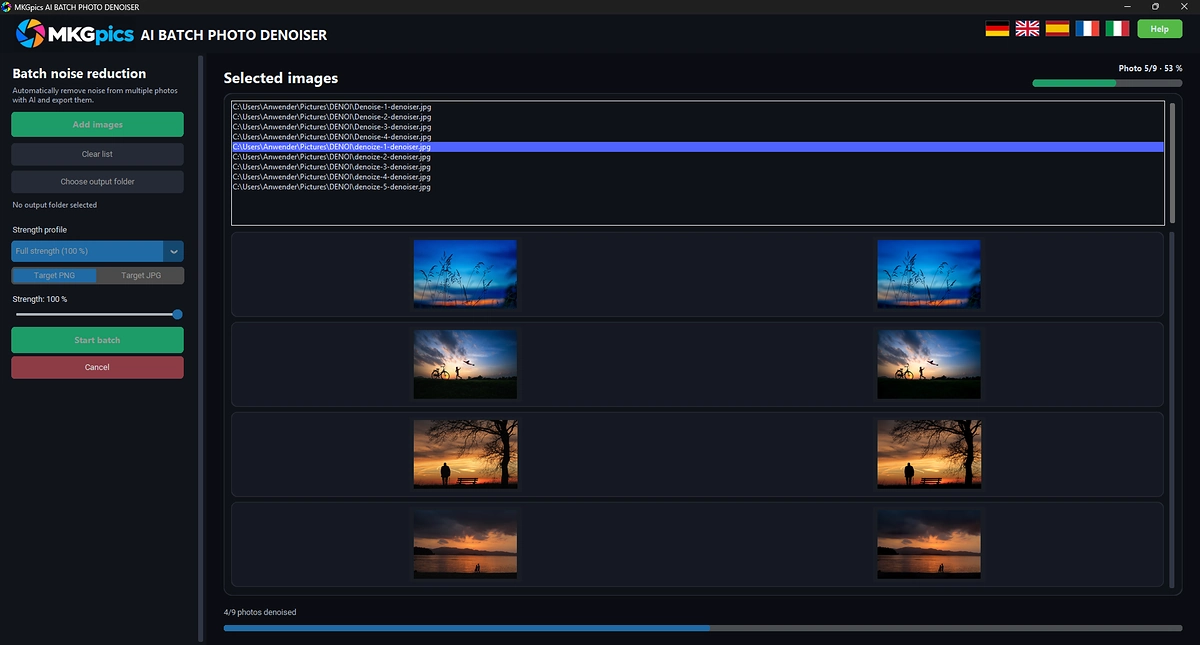
Batch AI photo denoiser with strength profile and output folder for whole photo folders.
Everything in the Batch AI Photo Denoiser at a Glance
- Remove the noise from whole folders of photos in one run
- Choose one photo in the dialog and the program offers to load all images of its folder
- Files appear in file-name order, and image 2 comes before image 10
- The list can be cleared and refilled between runs
- Three strength profiles: Gentle, Medium and Full strength
- At a lower strength a part of the original stays in the result, the photo looks more natural
- Result in the size of the original
- Output as PNG or JPG
- File names end with the suffix _denoised
- Every finished image shows up in the preview next to its original
- Progress bar with counter and a progress display for the current photo, the current image is marked in the list
- Cancel ends the run, all images saved so far stay in the output folder
- At the end of the run a message appears with a button that opens the output folder
- Choosing the folder of the originals as output folder is refused, so the originals remain untouched
- Opens PNG, JPG, JPEG, WebP, BMP, TIF and TIFF
- Available in German, English, Spanish, French and Italian
- The denoising AI uses locally installed Python libraries, so there are no extra AI costs
- All photos are processed on your PC, nothing goes to a cloud
- Works without a subscription and without ongoing costs
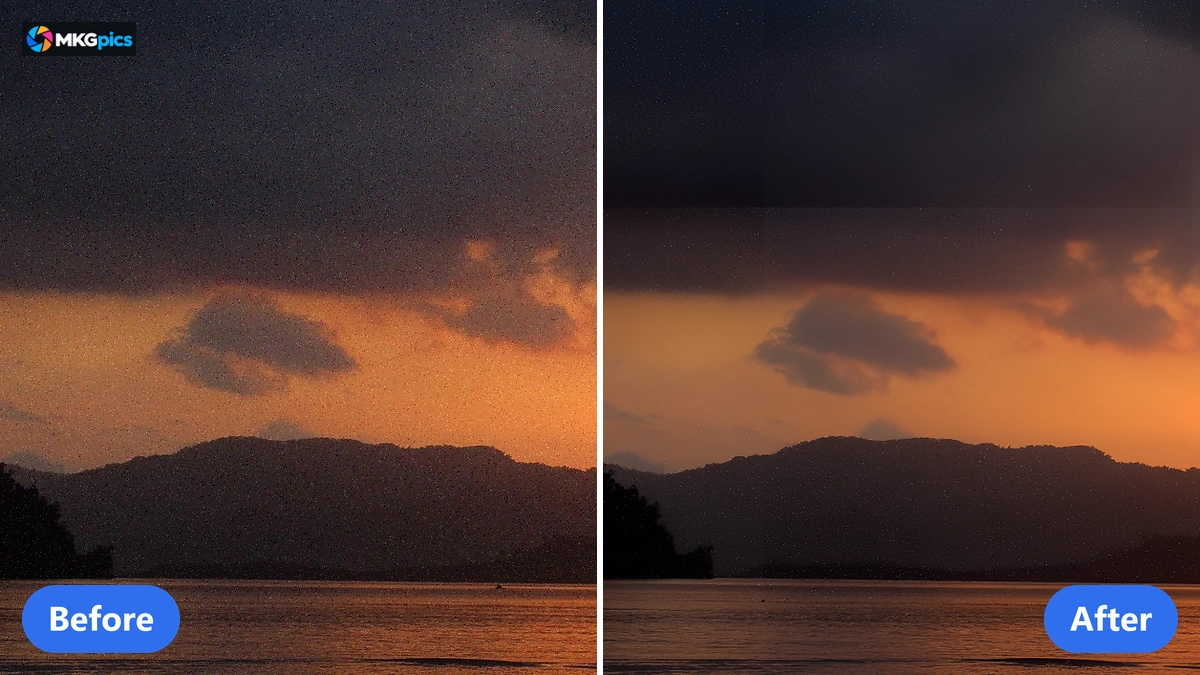
Before and after with batch image noise reduction AI, the noise goes and the image structure stays.
Three Steps to a Clean Folder of Photos
Add images, choose the output folder, start the batch: a whole folder needs nothing more.
Add images fills the list. If you pick one photo, the program offers to load the whole folder, and then all photos sit in file-name order with numbers sorted correctly: image 2 before image 10.
Strength profile, output format and output folder come next. Full strength with PNG as target is enough for most runs of batch image noise reduction AI. The Start batch button begins the run.
» Free Download Now
Every step stays in view.
The list marks the current image, the counter shows how many photos are denoised, and a progress display shows how far the current photo has come. Each finished image appears with original and result in the preview, so a setting that does not fit shows up early.
At the end the program reports how many images were saved, Open output folder shows the files, and a report names every image it did not process, with file name and reason. How long a run takes depends on the power of your PC and the size of the photos.
How the AI Removes Noise from Many Photos at Once
The AI recognizes the noise in a photo and smooths it without blurring the image structure. It runs on your PC without an internet connection, so no photo leaves the computer or trains a model.
The result has the same size as the original. A progress display for the current photo shows how far the calculation has come, which is helpful with large files.
The strength decides how much of the AI result goes into the finished image. Full strength takes the whole result, Medium and Gentle take less of it. The rest comes from the original, so a lower strength leaves a fine grain in place that keeps a photo alive.
Noise appears with high ISO values, in shots taken in dark rooms and in heavily brightened shadows. The preview shows for every photo whether the chosen strength removes enough noise, before the whole folder is finished.
Who Cleans Up Noisy Photos in Bulk
The program serves everyone who has to clean up many noisy photos at once.
Since everything happens on your PC, customer orders and private shots stay with you.
- Beginners start with the default setting and hold the cleaned folder after a few clicks.
- Hobby photographers rescue shots from dark rooms, concerts and dusk.
- Professionals process whole series after a shoot in one step instead of long sessions.
- Designers prepare photos for layouts, prints and large formats.
- Event photographers denoise hundreds of images of an occasion in one pass.
- Archives, clubs and families refresh old scans and phone photos.
Why Fixed Settings Matter for a Series
A series needs one look from the first photo to the last.
Strength profile and output format apply to every image of the run, so shots from the same event look uniform. Different material, say bright product shots, needs its own profile and its own run.
The counter, the progress display, the marker in the list and the preview with original and result show whether the setting fits. If it does not, press Cancel, change the strength and start again. The images saved so far stay in the output folder.
The folder with your originals is refused as output folder, and every result is written as a new file with the suffix _denoised, so a run never overwrites a photo.
A folder of fifty photos and a folder of five thousand cost the same: no subscription, no running costs and no cloud.
Event Nights, Studio Orders and Family Scans
From the concert night to the family album, one run saves hours that would otherwise go into handwork on every picture.
After an event, hundreds of shots from dark halls and rooms lie in a folder. The photos go into the list, the Medium or Full strength profile reduces the noise, and the results lie in the output folder as PNG or JPG. The folder turns into a series that goes to customers or into an album. Fine work such as sharpening or retouching is offered by the AI image editor.
» Download the Batch AI Photo Denoiser
In the studio, orders with high ISO go into the list. The Gentle profile keeps the grain natural, Full strength smooths even strong noise, and the preview shows each result next to the original. Afterwards the batch AI photo upscaler enlarges the series to print size.
Archives, clubs and families prepare scans and phone photos. The list keeps the file-name order, and your originals are never changed. Old black and white scans can then be brought into color with the batch AI image colorizer.
Questions on Batch Image Noise Reduction AI
How do I remove noise from several photos at once?
Add images or a whole folder, choose strength profile and output format, set the output folder and start the batch. The AI goes through the list from the first image to the last, and each result is written as a new file to the output folder.
Does denoising reduce the image quality?
The result has the same size as the original. The strength decides how much of the AI result goes into the image, and below full strength a part of the original with its fine grain stays in place.
Which strength fits my photos?
Full strength smooths even strong noise, Medium and Gentle keep more of the original.
Is there a subscription?
No. The PC program is a free download and needs no subscription.
Does the program need internet?
No. The entire AI calculation runs on your own PC, and no photo is uploaded.
Which image formats are supported?
PNG, JPG, JPEG, WebP, BMP, TIF and TIFF files can be opened, and the results are saved as PNG or JPG.
|
|
