AI Background Remover That Cuts Out Subjects as PNG with Transparency
The subject stays, the background goes: MKGpics AI PHOTO BACKGROUND REMOVER works as an AI background remover that delivers a PNG with transparency or a JPG with color in a few clicks.
MKGpics AI PHOTO BACKGROUND REMOVER is a program for the PC. The AI runs on your own computer: you open the image, start the cutout, adjust the result and save. There is no subscription, and nothing else has to be paid for.

You begin with Open image to cut out. The AI separates the subject from its surroundings, and the program takes care of the rest. JPG files are handled exactly like PNG, WebP or BMP files, and the second of the four steps in the sidebar is called AI Cutout.
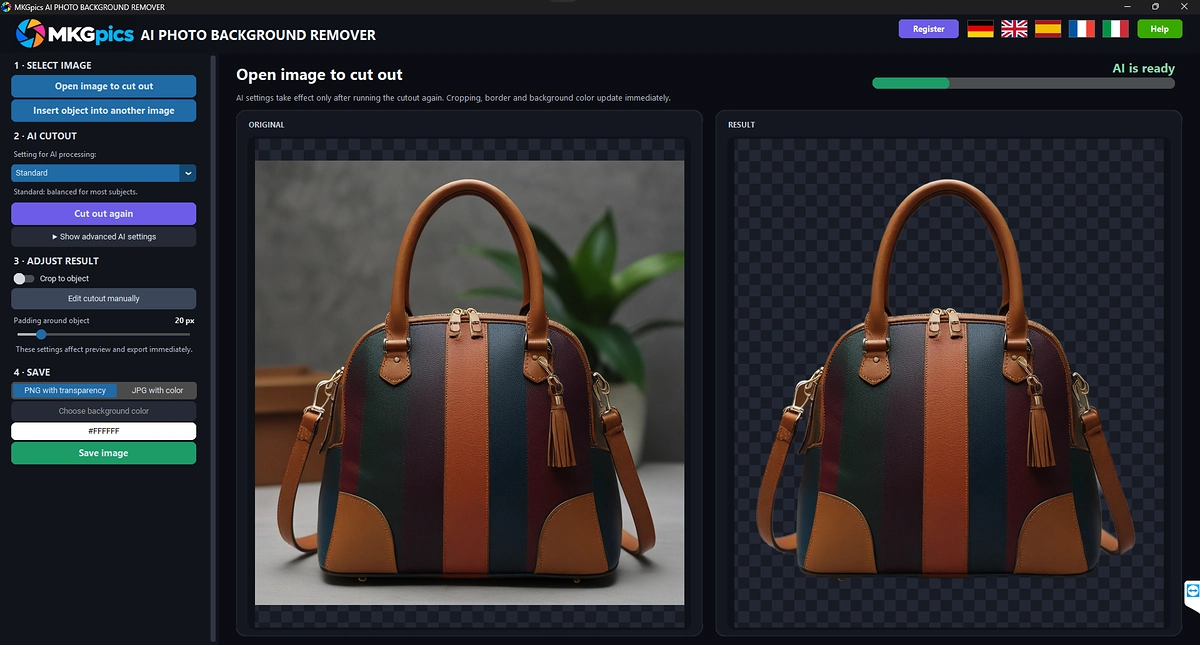
AI background remover with profiles, mask editor and image composite.
What the AI Background Remover Can Do
- Opens PNG, JPG, JPEG, WebP and BMP
- Four steps in the sidebar: Select Image, AI Cutout, Adjust Result and Save
- Three AI profiles: Standard, Fine details and Clean edges
- Standard works in a balanced way for most subjects
- Fine details keeps hair, fur and thin structures
- Clean edges cuts out products and objects with firm contours
- Alpha matting refines soft transitions at the edges and switches on or off
- Advanced AI settings for foreground sensitivity, background sensitivity and silhouette
- Recalculate with changed AI settings, the previous result stays in place until then
- Crop to the object with an adjustable border around the object
- Freely chosen background color, the preview changes at once
- Mask editor with a brush for Keep and Remove, with brush size, brush hardness and Undo
- Preview with original and result
- Output as PNG with transparency or as JPG with background color
- Image composite: place the object in another photo, move it with the mouse, rotate it and adjust opacity, brightness, contrast, saturation and sharpness
- File names with the suffixes _mask, _with_background and _composite
- The original image is never overwritten
- Menus and messages in German, English, Spanish, French and Italian
- Python AI libraries installed on your PC do the cutting, so no AI fees arise
- Your photos stay on the PC, nothing is uploaded
- No subscription and no recurring fees
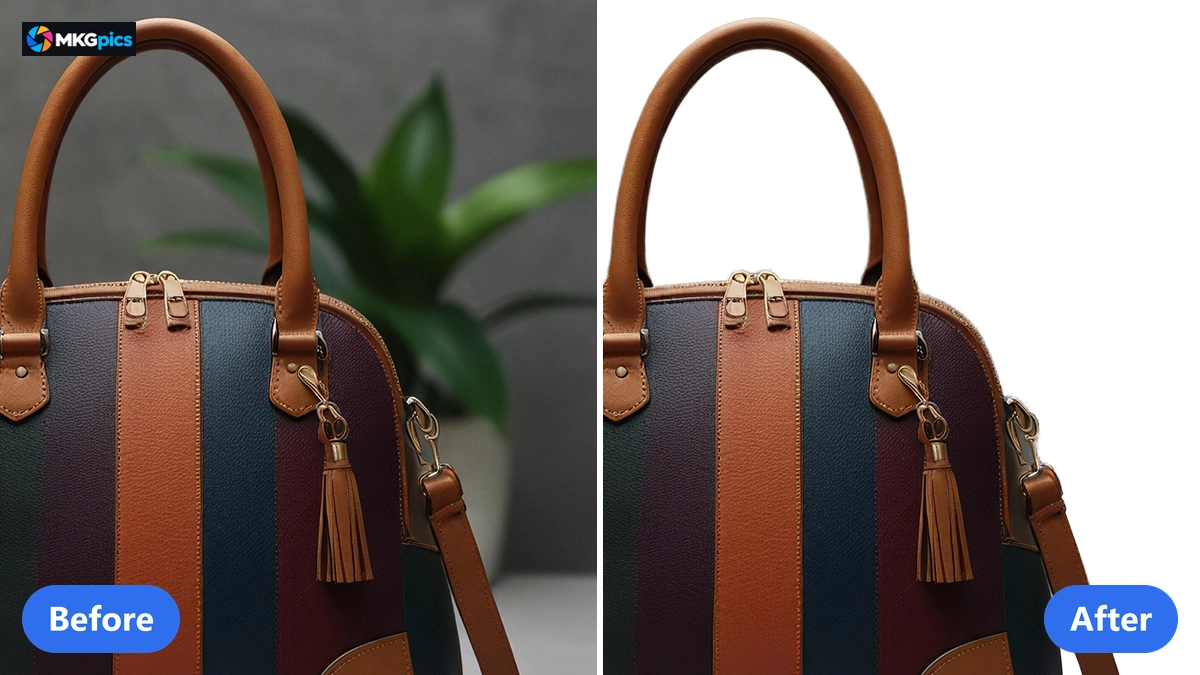
Before and after when you remove the background from an image, the subject stays and the background disappears.
Four Steps to Remove the Background from an Image
Open the image, pick a profile, start the AI, save: a cutout needs nothing more.
Open image to cut out loads the photo into the program. With a clear subject the profile Standard can stay selected, and one click on Remove background starts the AI. How long the cutout takes depends on the power of your PC and the size of the photo.
After the calculation the preview shows original and result. Crop, border and background color act without a new calculation, only changed AI settings need a new cutout run.
» Download Now for Free
Saving is the last step.
For a transparent background choose PNG with transparency. The file is written as a new file, and the name ends with _mask. JPG with color fills the free area with the chosen background color instead, white is preset, and the name ends with _with_background.
Your original stays untouched: if you type the original file name, the program refuses it, so every result ends up as a new file.
Three AI Profiles for Hair, Products and Clean Edges
The AI cuts the subject out of the photo and leaves the background transparent. The cutout model is stored as a file on your PC, so no internet connection is needed, and your photos are never sent anywhere or used for training.
The three profiles decide how strictly foreground and background are separated. Standard is the balanced basic setting for people, animals and objects. Fine details keeps hair, fur and thin structures, so it is the profile to pick when you cut out a person with loose hair.
Clean edges separates more strictly and delivers firm lines around bottles, shoes, furniture and devices. Alpha matting works in all three profiles and prevents the light edge line that simple cutouts leave behind.
The brush in the mask editor works like a background eraser for leftovers. Keep makes areas visible, Remove makes them transparent, and brush size and brush hardness are adjustable. Undo takes the last stroke back, and Apply sends the correction to the main window.
Crop to object removes the empty space around the subject. The border around the object is adjustable, so the subject does not stick to the edge of the image. With crop switched off, the cutout keeps the size of its original.
The image composite places the cut-out object in another photo. Open a background photo, move the object with the mouse, rotate it, scale it and adjust opacity, brightness, contrast, saturation and sharpness to the new surroundings. Designers who build collages save the composite as a new file.
Who Needs an AI Background Remover on the PC
The program serves everyone who separates subjects from the background and reuses the file.
Because everything runs on your PC, pictures of customers, pupils and staff stay in your own hands. Agencies, authorities and schools can work with them, and sellers keep their product pictures at home.
- Online sellers separate product pictures from the background for shop and marketplace.
- Photographers deliver portraits and product shots as finished cutouts.
- Designers receive subjects with transparency for flyers, posters and websites.
- Agencies place people and objects in new surroundings with the image composite.
- Clubs, schools and authorities unify member photos and ID pictures with the same background.
- Beginners reach the result with the preset, hobby photographers and professionals set profile, crop, mask and background color themselves.
Why Clean Edges Make or Break a Cutout
A good program hits the edge and leaves the user in control of the result.
The edge decides the picture. Hair and fur need other thresholds than glass, metal or fabric edges, so the profile has to fit the subject. Alpha matting then softens the transition between subject and new background.
Control after the calculation counts as well. Mask editor, crop and background color keep changing the result, and the preview shows each change at once.
Your originals are safe: the program refuses the file name of the original when saving, every result is written as a new file, and the original image stays as it was.
And there is nothing to renew. No subscription, no cloud: whether it is your first cutout or your five-hundredth, the AI on your own PC does the same work.
Everyday Cutout Work in Shops and Studios
From product photo to portrait, the AI saves the hours that otherwise go into cutting out by hand.
In online retail the AI replaces manual work along the path. Shop owners use the program as a product photo background remover: the profile Clean edges separates bottles, shoes and devices, and the result lies ready as PNG with transparency or as JPG on white. For whole product ranges there is the AI batch background remover, which cuts out a complete folder in one run.
» AI Background Remover Program Download
In the studio, portrait series need the profile Fine details. It keeps hair and fabric edges, and the background color of the JPG output creates a uniform look across the series. If a person disturbs the background, the AI object remover helps.
Designers and editors use transparency further. Each PNG with transparency drops into a layout without a white box, and the image composite turns a cutout into a finished montage within one window. Further corrections such as sharpening, noise removal and retouching are available in the AI image editor in one window.
Common Questions About Removing Backgrounds with AI
How do I remove the background from a photo with AI?
Open the photo with Open image to cut out, choose a profile and click Remove background. The AI separates the subject, the preview shows original and result, and Save image writes the file.
Do I have to pay anything after the download?
No. The program works without a subscription and without running costs, and the download for the PC is free.
Do my photos leave the computer?
No. The cutout is calculated on your own PC, so nothing is uploaded and no photo trains a model. An internet connection is not needed.
How do I get a PNG with a transparent background?
Choose PNG with transparency when saving. The background stays transparent and the file name ends with _mask.
Does the program cut out hair and fur cleanly?
The profile Fine details keeps thin structures, and alpha matting calculates soft transitions at the edges. Leftovers are corrected with the brush in the mask editor.
How do I place a cut-out person in another photo?
After the cutout open the image composite, choose a background photo, move the object with the mouse, adjust size, rotation and color, and save the composite.
|
|
