
| Software > MSG to EML converter - E-Mail Converter |
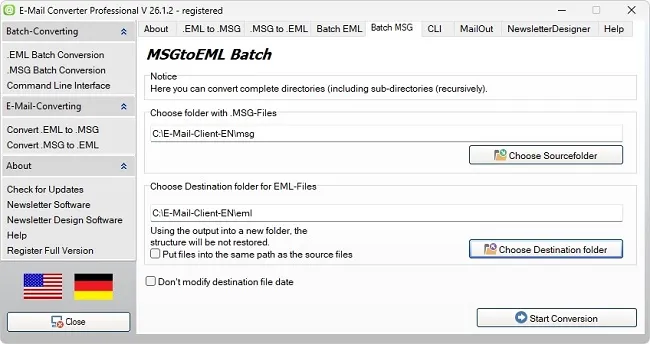
MSGtoEML E-Mail Converter ProfessionalBulk / Batch E-Mail Converter - MSG to EML ConverterMSGtoEML conversion with the MSG to EML converter / E-Mail Converter is also possible in batch or bulk mode.
|
| Functions of MSGtoEML - E-Mail Converter |
|
|
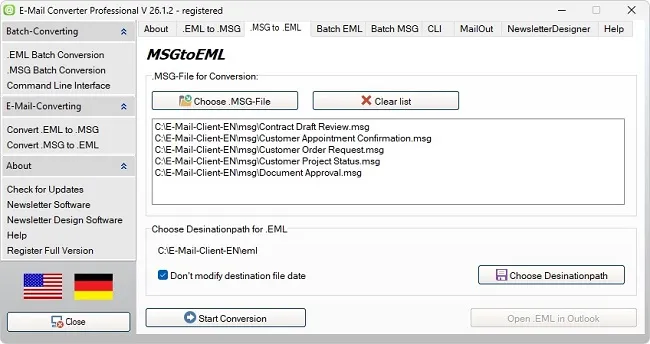
| Screenshot MSG to EML Converter Professional |
Converter MSG to EML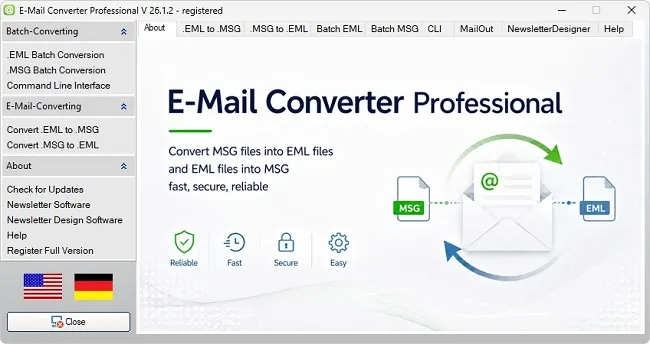 Image: Convert MSGtoEML Converter EML to MSG / EML to MSG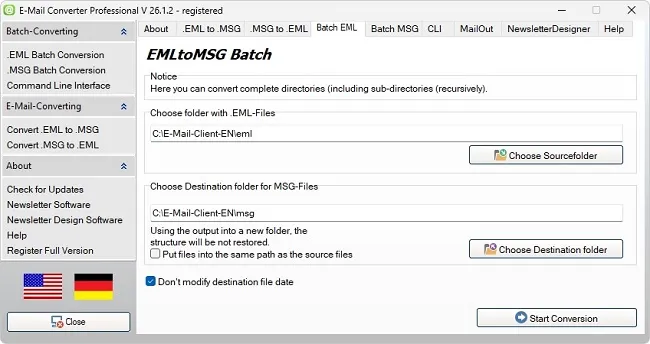 Image: Convert EML to MSG / EML to MSG |
| * Note: |
| "Outlook", "Outlook Express" and "Windows Mail" are registered trademarks of Microsoft Corporation or Microsoft Deutschland GmbH. |
| Structure of the "E-Mail Converter Professional" program for MSGtoEML |
MSG to EML Converter and EML to MSG Conversion
MSG to EML conversion refers to the process of converting an Outlook file (.msg) into the open e-mail format (.eml).MSGtoEML and EML to MSG are two conversion processes related to e-mail client workflows. This conversion process enables users to send e-mails from MS Outlook to other applications such as Thunderbird, etc. Batch EML to MSG conversion is basically the opposite of batch MSG to EML conversion, which means that an incoming e-mail file from a third-party e-mail application is converted into Outlook.
MSGtoEML - download for free
These conversion processes are not only essential for achieving compatibility between different mail clients, but also for ensuring the compatibility of sent or received e-mails by preventing future vulnerabilities in e-mail applications. Therefore, it is very important to convert MSG files to EML and vice versa correctly and efficiently in order to ensure smooth e-mail communication.
MSGtoEML
Product image: MSGtoEML
Converting MSGtoEML means converting MSG files from various e-mail clients into an EML file.
This is helpful when e-mail software does not work with the EML format. With the MSGtoEML function, you convert your e-mails and then open them in the other e-mail client.
EML to MSG
Product image: EML to MSG Bulk converting EML to MSG means converting e-mails either from MSG file types into the EML format (Extended Mail List).
This is useful when a specific e-mail program does not work with the MSG format. With this function, you can easily open your e-mails in another e-mail client.
Converting MSG to EML and Converting EML to MSG
MSG and EML are file formats that are used very frequently in the digital world.MSG stands for Outlook Message File, while EML stands for Electronic Mail. Both formats are used to send and receive e-mails. However, to convert messages into another format, they must be converted from one format to the other. MSGtoEML and EML to MSG are two of the most common conversion processes.
Convert MSG to EML
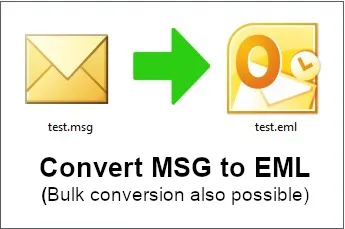
Product image: Convert MSG to EML (also possible in batch mode)
These conversions are useful when e-mails need to be transferred from one e-mail client to another that uses the EML format. The conversion from MSG to EML is performed using our special E-Mail Converter.
Convert EML to MSG
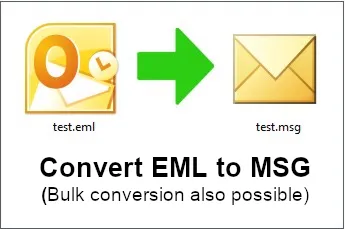
Product image: Convert EML to MSG (also possible in batch mode)
These conversions are used when e-mails need to be transferred to an Outlook account that uses the MSG format. Converting EML to MSG is also carried out by our E-Mail Converter. It is important to note that no data is lost when converting MSGtoEML and EML to MSG, since both message formats have different formatting characteristics.
In a similar way, it is also possible to convert EML files into .MSG files. The E-Mail Converter simplifies the conversion of EML files to MSG and vice versa.
Both conversion types are also combined to improve compatibility between different e-mail clients. For example, if you want to transfer your e-mails from one e-mail client to another, you can do this by converting EML into MSG format and vice versa. This function is particularly helpful if you need to open files in EML format but only have an MSG file available.
| Useful Information About MSG to EML converter |
What Is an MSG to EML Converter?
The MSG to EML converter is a software tool that converts e-mail files from the MSG format (Microsoft Outlook) into the EML format (e.g. for Thunderbird, Apple Mail, or other e-mail clients). The MSG format is typically used by Outlook and stores all information of a single message - including attachments, headers, formatting, and metadata. The EML format, on the other hand, is a more universal, text-based format that is supported by many other programs.The MSG to EML converter is helpful for performing this conversion quickly, reliably, and with complete preservation of all e-mail attributes. Modern versions of the converter also offer bulk or batch conversion, allowing multiple MSG files to be converted into EML files at the same time. This function is very useful when large amounts of data need to be processed or complete mailboxes need to be exported.
MSG to EML converter
In addition, the MSG to EML converter often also supports control via CMD-line parameters (command-line parameters). This allows the conversion process to be automated and integrated into scripts or scheduled tasks. This makes it possible to perform conversions regularly and without manual intervention - ideal for server migrations, backups, or automated e-mail archiving.
| It Is Important to Use the Right MSG to EML converter |
Which MSG to EML Converter Is Right for Me?
1. Compatibility & FormatsCheck whether the MSG to EML converter supports all relevant MSG files (e.g. from older and newer Microsoft Outlook versions) and whether export to EML files works correctly.
2. Bulk/Batch Conversion
If you have many files (e.g. complete mailboxes or archives), it is important that the tool can process multiple MSG files simultaneously (batch/bulk).
3. MSG to EML converter with CMD Line / Automation
If you are planning automated workflows (e.g. scripts, scheduled jobs, server migration), check whether the tool supports command-line parameters ("CMD Line"). For example, some tools mention that "command line options" are available.
4. Data and Metadata Preservation
E-mails often contain attachments, embedded messages, headers, recipient/sender information. A good tool should preserve these.
5. Folder Structure & Selection Filters
If your MSG files are located in many subfolders, it can be helpful if the MSG to EML converter preserves the folder structure or offers filters (date, sender, subject).
6. Trial Version / Licensing
Many MSG to EML converters offer a free trial version with limitations. Check whether the full version meets your requirements - number of files, support, operating system.
7. Security & Offline Processing
If e-mail archives are sensitive, the converter should work locally (without uploading to the Internet) and should not send any data to third parties.
Decision Support - Depending on the Scenario - for the Right MSG to EML Converter
- If you only have a few MSG files and want to do this once: A simple MSG to EML converter is sufficient, with a GUI and without major automation requirements.
- If you have hundreds or thousands of files (e.g. archive migration): Pay particular attention to batch/bulk capability, filter options, and automation (CMD line).
- If you want to automate conversions regularly (e.g. daily/weekly processes): A tool with command-line support is essential here - this allows scripts or scheduled tasks to be used.
- If data security and compliance are important (e.g. company or legal archives): Choose an MSG to EML converter that works locally, comprehensively preserves metadata, and has a good inspection/audit function.
| Use Cases for the MSG to EML Converter |
The Benefits of the MSG to EML Converter
When converting MSG files to EML with the MSG to EML converter, basic content is fully preserved. This includes subject lines, attachments, sender data, receipt times, plus the entire formatting of the message. This allows archived e-mails to be transferred without loss and then imported into Thunderbird or Windows Mail, for example. Anyone who regularly wants to convert Outlook MSG receives a stable and time-saving solution.The MSG to EML converter is often used in a business environment when e-mail inventories need to be backed up or migrated. By converting them into EML files, old archives can be managed more easily and made accessible in the long term. Especially during system changes or integration into other communication platforms, the EML format provides greater flexibility and transparency.
The MSG to EML converter can also be useful for private users, for example when restoring old messages or transferring e-mails to a new computer. Thanks to the clear structure of the generated EML files, the overview is maintained, and stored information can be searched or backed up without effort. Anyone who repeatedly creates e-mail backups also benefits from better data organization.
With extensive data inventories, the MSG to EML converter demonstrates its strength in processing speed. Multiple files can be converted in one run without affecting system performance. This saves time and reduces manual steps, especially with larger e-mail archives.
For anyone who wants to archive their Outlook messages in a readable and organized way over the long term, the MSG to EML converter is a well-thought-out support tool. It helps store essential communication data in a future-proof way and keep it accessible independently of the respective software.
Why Conversion with the MSG to EML Converter Makes Sense
Many users store their e-mails in Outlook for years until the amount of data eventually becomes too large or a new system is introduced. MSG files can be opened within Outlook, but outside this program they are hardly usable. By converting them into EML files, this problem is solved. The format is open, platform-independent, and can be further processed with common mail programs.Download E-Mail Converter for free
The MSG to EML converter ensures that old e-mail archives remain usable. This is particularly important in companies when communication histories are legally relevant or required for internal documentation. This means that even older message inventories can be searched at any time and exported when needed, without additional software being required.
Technical Advantages of the MSG to EML Converter When Converting Outlook MSG
When converting MSG to EML, all header data, attachments, and metadata are fully preserved. This prevents content from being lost or displayed incorrectly. Anyone who wants to transfer multiple mails into structured folders benefits from stable processing and clear file output. The converter also supports large amounts of data without affecting system performance.Another advantage of the MSG to EML converter lies in the compatibility of the generated files. EML is a standard format that can be opened directly with programs such as Mozilla Thunderbird, Windows Mail, or Apple Mail. An example: Outlook saves individual emails as MSG files. This causes trouble when you move to another email provider or share archived messages with people who do not use Outlook. EML files work in Thunderbird, Apple Mail, and other mail apps. Online MSG viewers are fine for test files, but business emails should stay on your own device. A local MSGtoEML converter keeps the conversion local and preserves headers, dates, and attachments during export. This means e-mails can not only be read, but also forwarded, archived, or backed up - completely independently of the original system.
MSG to EML Converter and E-Mail Archiving
The long-term storage of e-mails is an important issue in both business and private environments. By using the MSG to EML converter, archiving becomes significantly easier. EML files can be stored in folders, indexed, and sorted by sender or date. This makes later searches easier and saves time when managing extensive mailboxes.The tool is very useful for carrying out conversions in large quantities. Instead of exporting each message individually, complete directories can be processed automatically. This is ideal for backups, system changes, or the long-term preservation of project data.