Last updated on May 4, 2026 - In Media KG by Sandra Raun
The "MultiEsoCon" is a powerful Solfeggio 432 Hz converter that converts all audio files on your PC into different Solfeggio frequencies at once.
The MultiEsoCon music converter processes entire folders and folder structures on your PC. You select the desired frequency and output format; the conversion works with common audio formats and the supported Solfeggio values.
Key Features of the 432 Hz Converter
Functions of the 432 Hz converter MultiEsoCon
Batch conversion: The music batch converter processes multiple audio files with the same settings and exports them to the selected frequency.
Easy operation: With its clear interface, MultiEsoCon music batch converter is suitable for both beginners and experienced users. In just a few steps, your entire music library can be exported to the selected frequency.
Conversion quality: Output format, source file, and selected settings determine the result of the frequency conversion.
Frequencies for export: 432, 528, 174, 285, 396, 417, 639, 741, 852, and 963 Hz (all Solfeggio frequencies).
The Benefits of the 432 Hz Music Converter MultiEsoCon
The 432 Hz converter changes music files to other frequencies in batch mode.
MultiEsoCon supports the processing of complete music folders when tracks need to be exported with consistent settings. This makes it possible to test alternate tunings and create custom versions of existing songs.
Create alternate frequency versions of your music files with MultiEsoCon.
Solfeggio frequencies are tone values described in musical contexts. They are associated with pitches, tunings, and sound colors.
Origin and History of Solfeggio Music:
Solfeggio frequencies are linked to a musical tradition mentioned in religious music from the Middle Ages. They are also associated with Gregorian chant and Western music theory.
These frequencies became known in the 20th century through publications by Dr. Joseph Puleo, who connected them with ancient chants and assigned them individual tone characters.
What Are Solfeggio Frequencies?
174 Hz – Low pitch range: This frequency is associated with a deep sound character and is used for slow music pieces.
285 Hz – Warm sound range: This frequency is described as a soft tone range and can be used for slow sound layers.
396 Hz – Earthy sound: This frequency is associated with a stable and darker listening impression.
417 Hz – Changing sound color: This frequency is used for music pieces with a moving sound character.
432 Hz – Alternate tuning: Many listeners describe this frequency as a softer sound and use it as an alternate tuning to 440 Hz.
528 Hz – Bright sound range: This frequency is described as a clear and present tuning.
639 Hz – Warm midrange: This frequency is associated with soft sound colors and even music layers.
852 Hz – High pitch range: This frequency is used for bright, clear tone layers and atmospheric music pieces.
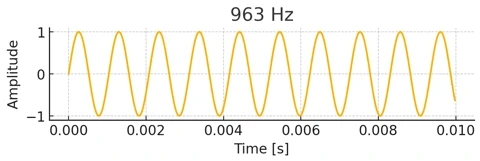
963 Hz – Very high pitch range: This frequency is described as a very bright tone range and is used for floating sound images.
Diagram of the Solfeggio frequencies
Advantages and Disadvantages of the 432 Hz Converter MultiEsoCon
The 432 Hz Converter MultiEsoCon is a flexible program for changing audio files from the standard 440 Hz tuning to the alternate 432 Hz frequency.
The batch conversion function allows multiple files to be processed at the same time. The advantages and disadvantages of this 432 Hz converter are listed below. Existing MP3 or WAV files can be processed through this 432 Hz converter for music files when playback at 432 Hz is preferred.
Advantages of the 432 Hz Converter MultiEsoCon
Batch conversion: Multiple files can be converted in one workflow. With the 432 Hz batch converter MultiEsoCon, complete music libraries can be processed in a single run.
Clear interface: The helpful layout of the 432 Hz converter allows beginners to use it without requiring technical knowledge.
Support for many file formats: The converter is compatible with numerous audio formats such as MP3, WAV, FLAC, and AAC.
Conversion quality: The result depends on the source material, target format, and selected settings.
Customizable settings: Users can adjust individual settings to match the conversion result to their personal preferences.
Fast processing speed: Thanks to optimized algorithms, the 432 Hz converter works quickly and reduces waiting times, even with large file sets.
Regular updates: The developer of the 432 Hz converter provides regular updates to improve the software and add new features.
Disadvantages of the 432 Hz Converter MultiEsoCon
No real-time conversion: The 432 Hz batch converter has no method for live conversion of audio signals, which may be relevant for musicians or DJs.
No mobile version: The 432 Hz converter is currently not available as an app for mobile phones or tablets, which limits mobile use.
Unique Qualities and Associations of Solfeggio Music
Music frequency (Hz)
Range
Sound description
Use
Note
174 Hz converter
Low range
Deep tone
Slow sound layers
Described as a low pitch area
285 Hz converter
Warm range
Warm tone
Slow audio pieces
Associated with soft sound layers
396 Hz converter
Low range
Earthy sound color
Slow audio design
Used in musical descriptions
432 Hz converter
Midrange
Soft resonance
Sound comparison
Used as an alternate tuning
528 Hz converter
Midrange
Bright sound color
Sound design
Used in Solfeggio frequency descriptions
963 Hz converter
High range
Very bright tone area
Sound layers
Associated with high sound images
432 Hz Music Converter – Use and Meaning
In alternative music styles, 432 Hz music frequencies are used for audio pieces and alternate tunings.
Using these frequencies is part of personal sound preference and musical interpretation. No binding statements about the listening impression are made here.
Solfeggio frequencies come from musical traditions and are now used in audio editing, music production, and frequency-based export projects.
432 Hz converter
MultiEsoCon is suitable for users who want to process complete folders, individual tracks, or larger music archives with fixed frequency values.
Solfeggio frequencies can be used as fixed target values for editing audio files.
Technical Classification of Solfeggio Frequencies:
Frequency value: Each setting represents a specific target value selected during export.
Source material: The audio file is recalculated from the existing tuning to the selected value.
Export: The result is saved as a new file in the selected audio format.
Comparison: The new file can be compared with the original version and archived separately.
Solfeggio Frequencies and Their Corresponding Musical Notes
Note: F3 at 174 Hz
Note: C#4 at 285 Hz
Note: G4 at 396 Hz
Note: G#4 at 417 Hz
Note: A4 at 432 Hz music converter
Note: C5 at 528 Hz
Note: D#5 at 639 Hz
Note: F#5 at 741 Hz
Note: G#5 at 852 Hz
Note: B5 at 963 Hz
< /div>
432 Hz Converter for Music
The 432 Hz music batch converter processes multiple audio files with the same settings and exports them to the selected frequency.
Product image of the 432 Hz music converter
Main Functions of the Solfeggio 432 Hz Converter:
Batch mode is designed for larger music archives where multiple files are processed with the same export values.
Common Solfeggio frequencies are supported, along with audio formats such as MP3, WAV, M4A, AIFF, AIF, AAC, and FLAC.
The workflow consists of file selection, frequency selection, format selection, and export.
Operation takes place through a clear program interface with defined settings for input, target value, and output folder.
This keeps larger conversions traceable and consistently documented.
Applications of the 432 Hz Converter
The music batch converter is suitable for music archives, audio exports, format changes, and frequency versions of existing files.
432 Hz Converter with Batch Mode for Alternate Sound Versions
The 432 Hz converter for Solfeggio frequencies creates alternate frequency versions of existing audio files.
The selected tuning is a design factor. Musicians, producers, and listeners sometimes compare A 440 with 432 Hz to hear the difference on the same recording. Changing an audio file from 48 kHz to 44.1 kHz alters its sample rate but not its musical tuning; to convert music to 432 Hz, the pitch reference itself must be shifted. The frequency shifting tool helps create both versions from the same source file, so the comparison does not depend on a rebuilt project. A 432 Hz version can then be compared directly with the original 440 Hz file.
432 Hz Music Formula
The exported files can be saved as archive versions or used for personal audio projects.
Sample Video: 432 Hz Music Created with 432 Hz Converter
The MultiEsoCon 432 Hz converter is a Windows program for precise frequency adjustment and batch processing. Developed exclusively for Windows, this program is intended for users who need high accuracy, strong performance, and productive processing of large audio libraries. Compared with simple online converters, MultiEsoCon uses highly optimized processing technology that can convert thousands of files in a single run with consistent settings. The program is aimed at music producers, sound users, content creators, and users with larger audio libraries. MultiEsoCon combines batch processing with audio formats such as MP3, WAV, FLAC, AAC, and M4A. The conversion engine processes fixed target values such as 432 Hz as well as custom frequencies.
The interface is designed for a high level of clarity, so both beginners and advanced users can configure their settings with ease. A consistent workflow is important when working with large data sets. MultiEsoCon also includes extensive customization options that allow users to adapt conversion parameters to their projects. Whether complete libraries are retuned, individual tracks are adjusted, or audio material is prepared for productions, sound projects, or research purposes, this program delivers high-quality results. An experienced support team is available when needed and can assist with installation and operation. MultiEsoCon is designed for precision, performance, and repeatable conversion steps.
Advantages:
Batch processing for complete music libraries.
Converts full music CDs to 432 Hz.
Frequency conversion with fixed target values and clear export options.
Supports many audio formats such as MP3, WAV, FLAC, and M4A.
The 432 Hz Batch Converter is open-source software developed for users who need a simple but functional method for retuning audio files to 432 Hz. Designed mainly for Windows systems, the software serves as an accessible entry point for users who want to try frequency-based audio editing without dealing with the complexity of professional audio engineering programs. Despite its compact design, the program has practical features such as batch processing, which allows multiple audio files to be processed in a single workflow. This makes it suitable for preparing sound material for sound environments, sound projects, or personal listening preferences. Since it is an open-source project, the program benefits from transparency and community-based improvements. Users with technical knowledge can adapt or expand certain components, which adds flexibility for individual workflows. The supported formats, including MP3, WAV, FLAC, and other common audio formats, provide broad compatibility with most private music collections. Although this program focuses on basic conversion functions and has no advanced editing options, it still provides a reliable platform for simple retuning to 432 Hz and basic re-encoding tasks.
The focus is on basic retuning, format support, and a compact workflow.
Advantages:
Batch processing for editing multiple files at the same time.
Open source and free – full transparency and ongoing development through the community.
Supports several common audio formats.
Disadvantages:
Only available for Windows systems.
No real-time conversion or advanced audio adjustment features.
The 432 Hertz Music Converter is cross-platform software developed for users who want to retune both audio and video material to alternate frequencies. Compared with simple converters, this program has broad compatibility with macOS and Windows, so sound users and media production users can integrate the converter into their workflow regardless of the operating system. The software is designed for users who need frequency adjustment without compromising clarity. This makes it suitable for creating audio content or for experimental work in the field of frequency-based applications. One of the converter’s biggest strengths is its ability to process a broad selection of file formats, including MP3, WAV, FLAC, AAC, M4A, and numerous video formats. This makes the program useful for users who work with mixed multimedia projects. Thanks to batch processing, complete folders or libraries can be converted in a single run, reducing manual work and increasing productivity. The interface is practical for beginners while still offering enough depth for experienced users who need consistent results across large data sets. Since the software is paid, users receive ongoing development, regular updates, and structured customer support in return. This provides a stable environment with a predictable workflow, which is an important point for users who convert audio for professional or semi-professional purposes. Although there is no mobile version, the program compensates for this with strong desktop performance and a clear feature focus centered on accuracy and ease of use.
Advantages:
Supports batch processing for fast conversion of large collections.
Compatible with numerous audio and video formats.
Available for macOS and Windows, making it broadly accessible.
Disadvantages:
Paid software, which may be less attractive for casual users.
The Ultimate 432 Hz Converter is a browser-based real-time option for users who want to experience music in alternate frequencies without changing or downloading files. This program performs live pitch adjustment while audio is streamed from platforms such as YouTube or other web-based players. This makes it suitable for users who want immediate results and a mainly simple setup. Since the converter works directly in the browser, no installation is required, and it can be used on different desktop systems regardless of the operating system. Use takes place through the interface in the browser tab. This fast workflow is practical for directly experiencing how frequency adjustment affects the listening experience, whether for sound comparison, focused work, or personal preferences. The real-time algorithm adjusts pitch smoothly and preserves the natural musical character without requiring technical knowledge. As an online option, performance depends on the internet connection and browser capabilities. Since the program is designed exclusively for streaming content, it does not support importing local files or offline conversion. As a result, batch processing is not possible, which is reflected in the rating. The converter is therefore focused on streaming applications without installation.
Advantages:
Real-time pitch adjustment to 432 Hz during streaming.
No installation required; fully browser-based.
Fast and uncomplicated setup for daily use.
Disadvantages:
Only suitable for streaming platforms; no support for local files.
Requires a stable internet connection for smooth playback.
The Audio Frequency Converter by MobWheel is a detailed desktop application developed for users who need precise control over retuning audio files. Unlike simple converters that only have preset values, this program works with frequency inputs accurate to two decimal places. It is intended for users who need finely adjusted frequency values for individual audio files. The software uses widely used audio formats such as MP3, M4A, FLAC, and WAV, which allows smooth integration with most digital music libraries. One of the application’s biggest strengths is its strong adaptability. Users can define exact frequencies instead of being limited to standard values such as 432 Hz. This supports workflows where exact frequency values are required. The export functions are designed for traceable settings and stable processing. Although installation is required and batch processing is not supported, the program focuses on precise conversion of individual files with a high level of control. The interface is suitable for both beginners and advanced users: beginners can use simple presets, while advanced users can set detailed parameters to reach the desired frequency exactly. The converter is mainly suitable for individual tracks with exact target values.
Advantages:
Custom frequency settings with accuracy up to two decimal places.
Exports to several high-quality audio formats, including MP3, M4A, FLAC, and WAV.
Very flexible conversion settings for detailed audio adjustments.
Disadvantages:
Requires installation on the device.
No support for batch processing, which slows work with large libraries.
*The ratings for the 432 Hz converters are based on current reviews and user feedback from the internet. They take into account criteria such as conversion quality, speed, batch processing, ease of use, and feature set.
FAQ - 432 Hz Converter
FAQ About the 432 Hz Converter and Solfeggio Frequencies
What is a 432 Hz converter?
A 432 Hz converter is a program that changes audio from the standard 440 Hz tuning to 432 Hz. With a 432 Hz music converter, you can create an alternate version of your audio file.
What is a 432 Hz converter used for?
A 432 Hz converter is used to transfer existing audio files to an alternate tuning. This is useful for sound comparisons, personal music archives, or different versions of the same track.
How does a 432 Hz music converter work?
The 432 Hz music converter changes the pitch of the audio file and exports the result as a new file. In batch mode, complete folders can be processed with the same settings.
Which audio file formats are supported by a 432 Hz converter?
The 432 Hz converter supports file formats such as MP3, WAV, FLAC, AAC, and other common audio formats.
Does using a 432 Hz music converter affect audio quality?
A 432 Hz music converter changes the pitch of the audio file. The perceived quality depends on the source material, target format, and selected export settings.
Is a 432 Hz converter easy to use?
Yes, this 432 Hz converter has a clear interface with file selection, batch processing, and customizable output settings.
Can I convert multiple tracks at once with a 432 Hz music converter?
Yes, this 432 Hz music converter processes entire folders of audio files, including subfolders. This is useful when larger music libraries need to be exported with the same frequency values.
Are there free 432 Hz music converters?
Yes, there are free 432 Hz music converters online. The feature set varies depending on the provider, file format, and export options.
Is a 432 Hz music converter suitable for all music genres?
Yes. A 432 Hz music converter can process audio files from different genres as long as the file format is supported.
How long does it take to convert a song with a 432 Hz converter?
The duration depends on file size, track length, target format, computer performance, and the number of files in batch mode.
Can I switch back to 440 Hz after using a 432 Hz music converter?
Yes, you can export a new version at 440 Hz if the converter supports this target value.
How is 432 Hz music described?
432 Hz music is described in alternative music styles as its own tuning. Many users describe this frequency as soft in sound. It is used for sound pieces and comparison versions.
Note: This text describes frequencies, sound tunings, and classifications from an audio editing perspective. The content does not make any binding statements about how the sound will be perceived. Music is a matter of individual taste.


 The "MultiEsoCon" is a powerful Solfeggio 432 Hz converter that converts all audio files on your PC into different Solfeggio frequencies at once.


 < /div>